Loading page
Preparing Product Demos data and workspace.
Loading page
Preparing Product Demos data and workspace.
Pin the extension in Chrome, then open it from your browser toolbar.
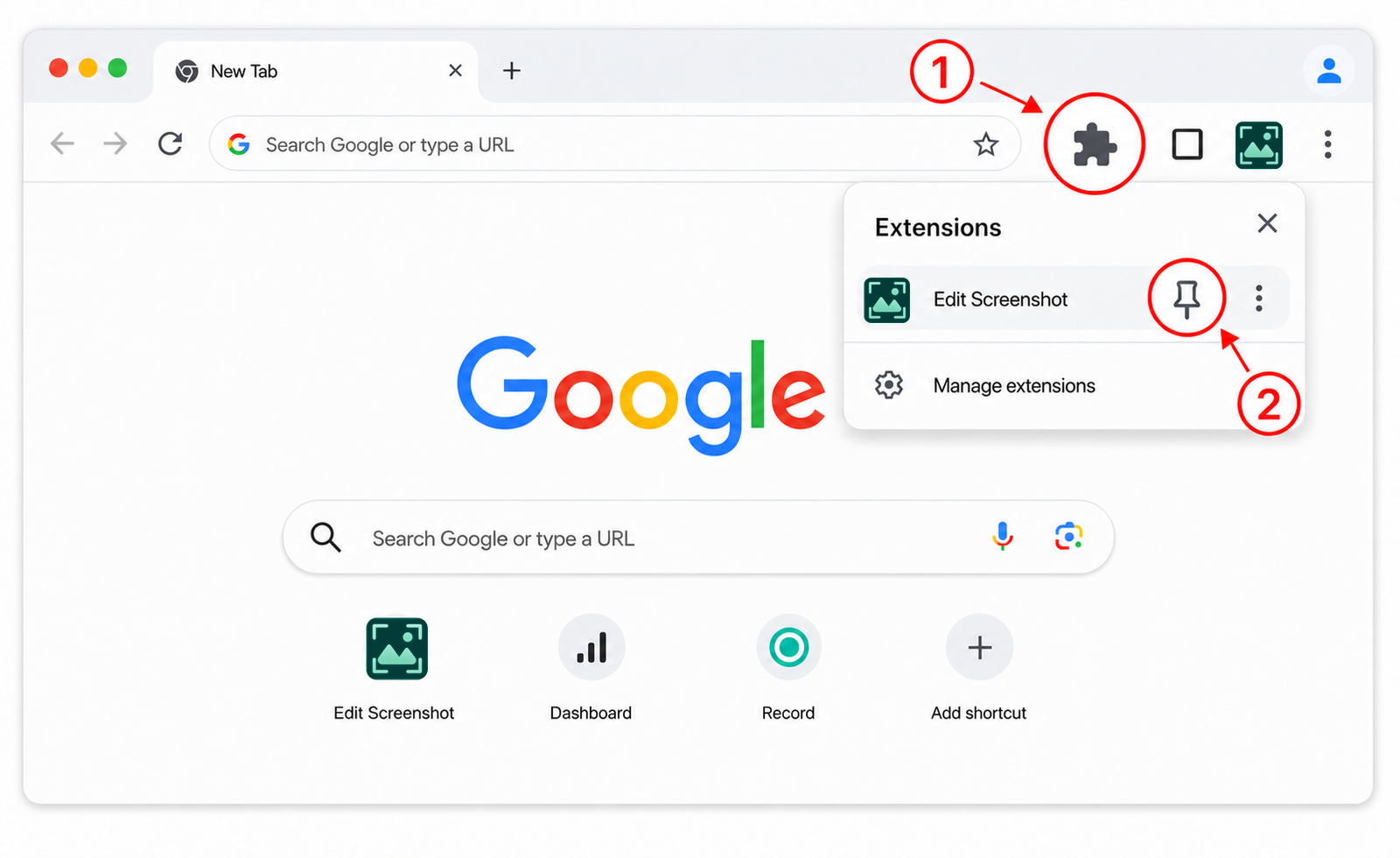
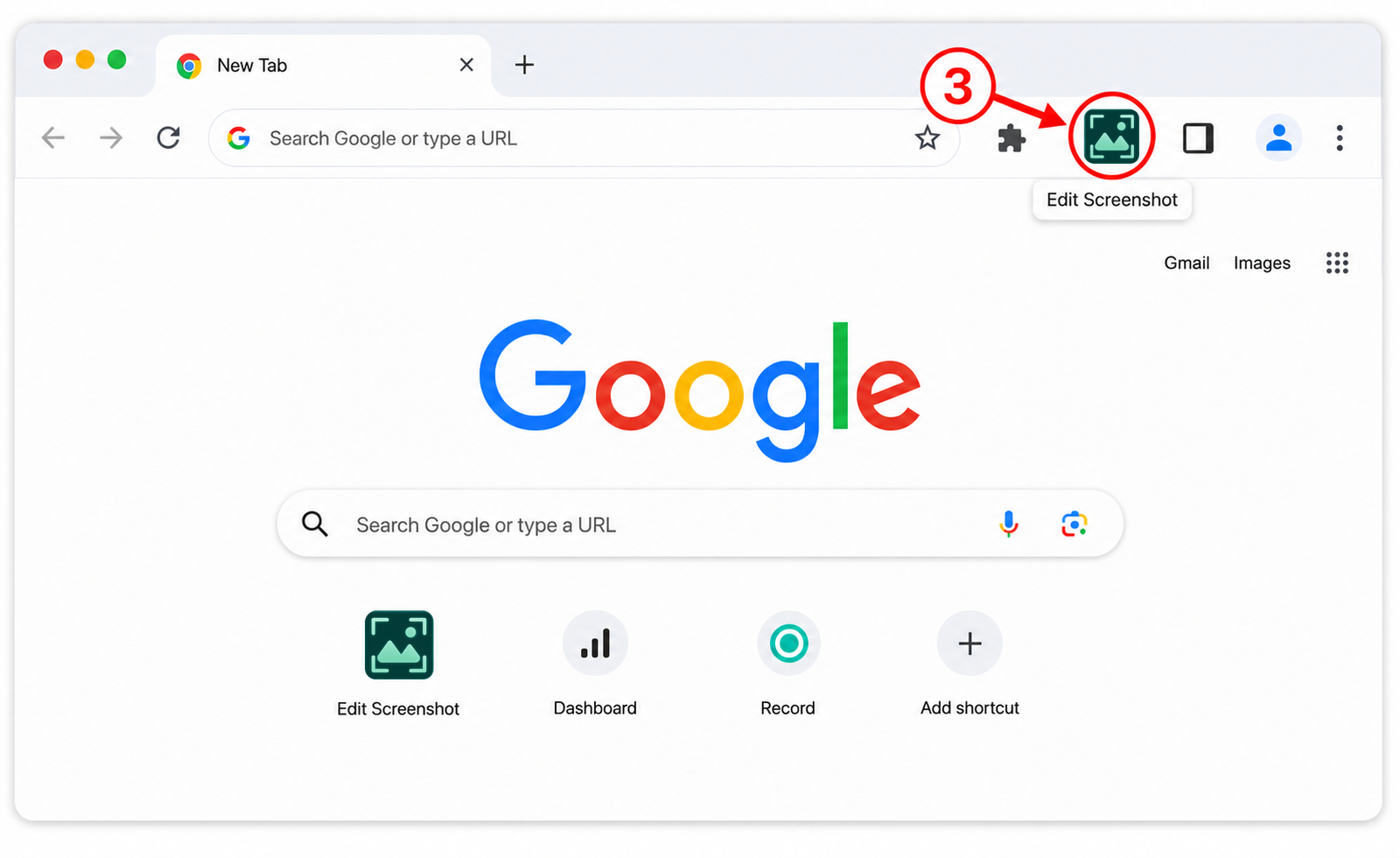
This Privacy Policy explains how the Chrome extension Edit Screenshot (the “Extension”) handles information. The Extension is published and maintained by the Product Demos development team (“we”, “us”, or “the developer”).
Edit Screenshot is a standalone mini-product maintained by the Product Demos development team. It provides local screenshot capture and image-editing tools without sending screenshot content to Product Demos.
The Extension has no user account, cloud synchronization service, or application backend. Screenshot processing and editing take place inside the user's Chrome profile.
The Extension handles information only when required to provide a feature requested by the user.
Page title and domain are associated only with the latest locally stored capture and may be used to generate a suggested export filename. The Extension does not create or transmit a browsing-history profile.
When a user selects a local image, the Extension handles the image content and filename locally. The image is validated and normalized to PNG, and embedded source metadata such as EXIF metadata is not retained in the normalized image.
Annotations, crop settings, flip and rotation state, export settings, and generated output are processed locally. Clipboard and download actions occur only after an explicit user action.
The Extension stores preferences and the accepted privacy-disclosure version in chrome.storage.local within the user's Chrome profile.
The latest screenshot or imported image is stored locally in the Extension's IndexedDB storage so that the user can reopen it. Creating or importing a new image replaces the previously stored image.
Preferences and privacy-consent status remain in local Extension storage until the user changes them, clears the Extension data, or uninstalls the Extension. Temporary editor state is held only for the current editor session unless it is exported by the user.
Downloaded files and content copied to the operating-system clipboard are outside the Extension's storage and remain under the user's control. Uninstalling the Extension does not delete files previously exported to the computer.
The Extension does not send screenshot-related information to the Product Demos development team or to third parties.
The Extension does not include analytics, advertising, behavioral tracking, telemetry, crash-report uploads, or remote code. The developer does not sell screenshot-related information or use it for advertising or profiling.
After the Extension is installed for the first time, it opens the HTTPS page linked below once. The Extension does not add query parameters, a user identifier, captured content, page title, page domain, settings, or browsing history to this URL. It does not reopen the page when the Extension, Chrome, or the browser starts or updates, or when the service worker restarts.
Loading a website necessarily sends standard connection and HTTP request information to the website and its hosting infrastructure. This may include the visitor's IP address, browser User-Agent, request timestamp, and security or server-log information.
The Product Demos website loads a Google Ads tag through www.googletagmanager.com. Google consent storage defaults to denied and may be updated when a visitor has saved a consent choice in the pd_google_consent_v1 cookie. Google and the website operator may receive technical request and consent information according to that choice and the website configuration. This website processing is separate from the local handling of screenshot content.
The first-install website does not receive screenshots, imported images, page titles, page domains, annotations, Extension settings, or exported files from the Extension.
The Extension uses Chrome permissions only for its disclosed screenshot and editing features. It declares no persistent host permissions and does not request the tabs permission.
activeTab Accesses the current tab after the user starts a capture.scripting Measures the visible page and provides selected-area interaction.storage Stores local preferences and privacy-disclosure status.unlimitedStorage Stores the latest image locally without a small extension-storage quota.downloads Saves a file after an explicit export action.offscreen Normalizes, crops, composites, and encodes images outside the page UI.The developer does not receive or share screenshot-related user data because that data remains in the user's Chrome profile. We may disclose information only if we actually possess it and disclosure is required by applicable law, necessary to protect security, or connected with a lawful transfer of the publisher's business.
The Product Demos website uses hosting infrastructure and Google Ads through Google Tag Manager. Its separate privacy notice describes the website operator, providers, purposes, retention, consent choices, and available controls.
The Extension uses Manifest V3, a restrictive Content Security Policy, local packaged code, and narrowly scoped permissions. It does not load executable code from remote servers. Screenshot-related data is kept in storage managed by Chrome.
No software storage method can be guaranteed to be completely secure. Users should protect access to their operating-system account and Chrome profile.
Exported files must be deleted separately by the user from the location where they were saved. The developer cannot access or delete screenshot-related data stored only in the local Chrome profile.
Questions or deletion requests concerning information collected by the Product Demos website can be sent to support@productdemos.io.
The Extension is a general-purpose screenshot editing utility and is not designed to knowingly collect personal information from children. Because screenshot content is processed locally and is not received by the developer, the developer does not knowingly maintain a database of children's screenshot content.
We may update this Privacy Policy when the Extension functionality or data-handling practices change. The Last updated date identifies the latest version. If a change requires a new in-product disclosure or consent under applicable rules, the Extension will present that disclosure before the affected data handling occurs.
The use of information received from Chrome APIs adheres to the Chrome Web Store User Data Policy, including the Limited Use requirements. Information handled through Chrome permissions is used only to provide or improve Edit Screenshot's disclosed, user-facing screenshot capture and editing functionality.
Screenshot-related information is not used for personalized advertising, retargeting, interest-based advertising, creditworthiness, lending, or unrelated profiling, and it is not made available for human review by the developer.
For privacy questions about Edit Screenshot, contact the Product Demos development team. Edit Screenshot is maintained as a standalone mini-product and does not share screenshot content with Product Demos.